
Cybersecurity advice for everyone
16 Aug 2026
A pragmatic list of cybersecurity advice for every home

Security is not an optional extra. It is a baseline requirement for any product that handles user data, credentials, or access to sensitive systems. For any application or service being used by more than one person this means central control, multiple administrator accounts and - most importantly - MFA enforcement. Such features should be defaults, from the beginning, for all license tiers.
There is no credible argument that passwords alone are sufficient for authentication; strong authentication is a requirement for any online account, and strong means Multi-Factor Authentication (MFA)1.
If you want a stat, how about this one from Microsoft:
We’ve found that more than 99.9% of compromised accounts don’t have MFA, which leaves them vulnerable to password spray, phishing, and password reuse
“Security at your organization: Multifactor authentication statistics”, Microsoft
When it comes to personal security, we should all make sure that any application or service we want to use supports MFA and turn it on immediately after signing up.
But in work situations it can often be more complicated. It might be a legacy application that does not support MFA, or a new service or application chosen without the involvement of IT and security. Common examples are accounting, HR, and CRM platforms chosen by finance, HR, or sales.
If you are evaluating a product, here is an approach to evaluating its approach to account security.
Organisations with a mature approach to selecting new applications and services will evaluate a candidate product’s integration and security support as part of their prior due diligence. For business applications, we can define four tiers of account security enforcement:
Many organisations, depending on their compliance requirements and approach to risk, may insist on at least option 3 for any new services and applications. Which does raise the question of why there are products being sold that do not support MFA enforcement or SSO, or charge more for them.
Let’s be clear: any product that supports multiple users must enforce MFA by default, or at least support the option for enforcement. If your application or service does not support MFA enforcement, at the very least, then it is not ready to release to organisations.
Added to that, MFA enforcement should never be an extra feature that costs more. If it does, you are effectively telling users on the cheaper license tiers that they have to use a less-secure option. Which hardly screams “we care about our customers’ security”, does it?
Having such features only on the enterprise tier punishes SMEs that care about security but are on tighter budgets.
It underlines why due diligence and proper testing are so important: once an organisation has adopted a product, it is hard to move to another one, so many are forced to go up a license tier to meet a newly imposed security or compliance requirement. Or worse, to lock down an application after an account compromise caused by a weak password and no MFA.
Cyber security needs to be part of the selection process for any new service or application. If you have a budget for a new application in your team, please speak to the IT and security teams before making any commitments.
I saw this directly in a previous role at a small company. We had 1Password on a middle-tier team license. That let us have shared vaults and account management, but did not let us audit MFA adoption across our users or enforce it.
Whilst we had a policy for mandatory MFA that all users had to read and sign off, we had no means to verify that all of our users were following the policy. During a compliance review, we decided this was not good enough, and while we debated moving 20 people to a new solution, we instead gave in and upgraded our licences to the enterprise tier.
Interestingly, the 1Password pricing page lists SSO as an integration rather than a security feature on the “Business” tier:

MFA enforcement is not mentioned explicitly, but it could be part of the management features:
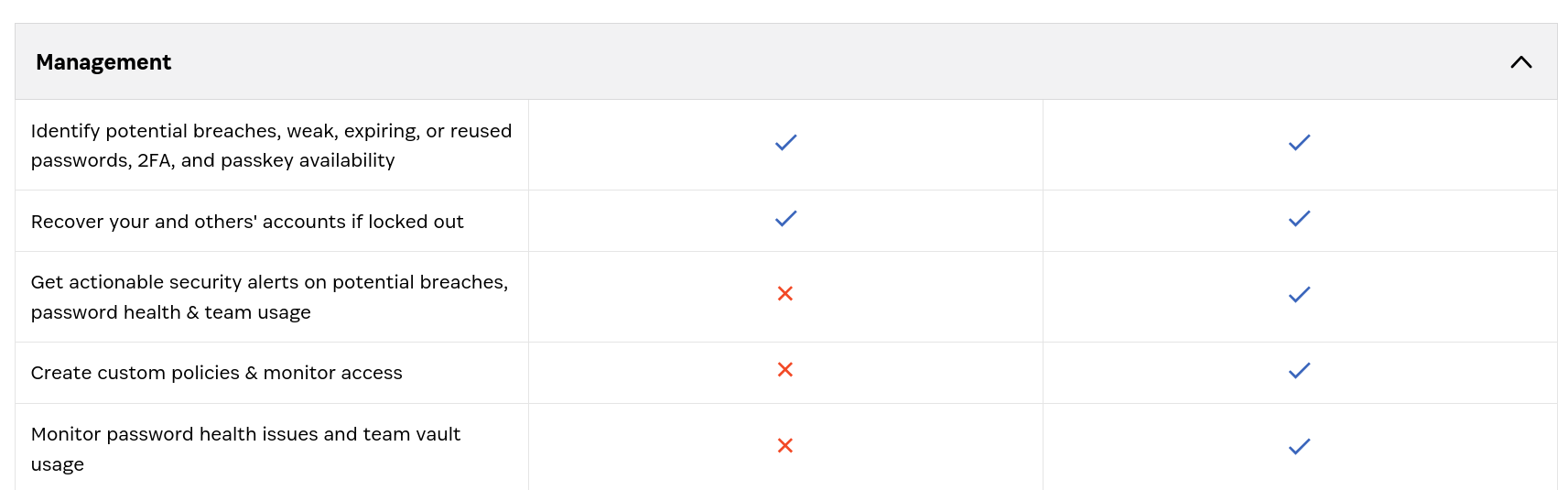
And remember: this is a security product. I do not understand how you can build and sell a password manager but think it is okay not to enforce MFA, or at least to let organisation administrators do so.
Of course, it is not just them. A current customer has an HR platform4 that also does not let you enforce MFA, although it does at least give you a report of which users have not enabled it, so HR can nag them directly.
Or passwordless authentication, such as passkeys or other FIDO2 mechanisms. ↩︎
With Single Sign-On (SSO), the application passes authentication to a separate identity provider. ↩︎
Sure, SSO does take a little more setup, but it is a one-time effort. ↩︎
Which of course includes names and addresses, bank account, and next-of-kin details. ↩︎
Topics

16 Aug 2026
A pragmatic list of cybersecurity advice for every home

15 Jul 2026
How to onboard users and managed devices without a single password

18 Jun 2026
We all need to channel our inner Johnny Rico and prepare for the next wave of bugs

13 May 2026
Restricting search engine and user access to a staging Hugo site with Cloudflare

06 May 2026
A custom Hugo sitemap that works with a Pages worker

29 Apr 2026
We've been knocking out some little tools...