
Security is a requirement, not a feature
16 Sep 2026
Why products should never charge more for default security features

A little while ago we released a new tool, which is here on GitHub, and now I’ve finally written a short blog about it.
The tool solves a requirement I’ve had for a long time: taking a Markdown file and converting it into a branded document. In this case, that means a templated DOCX file or a plain PDF. You can upload a Markdown file and any referenced images, or just a ZIP of the whole thing, and it will spit out a DOCX or PDF file:
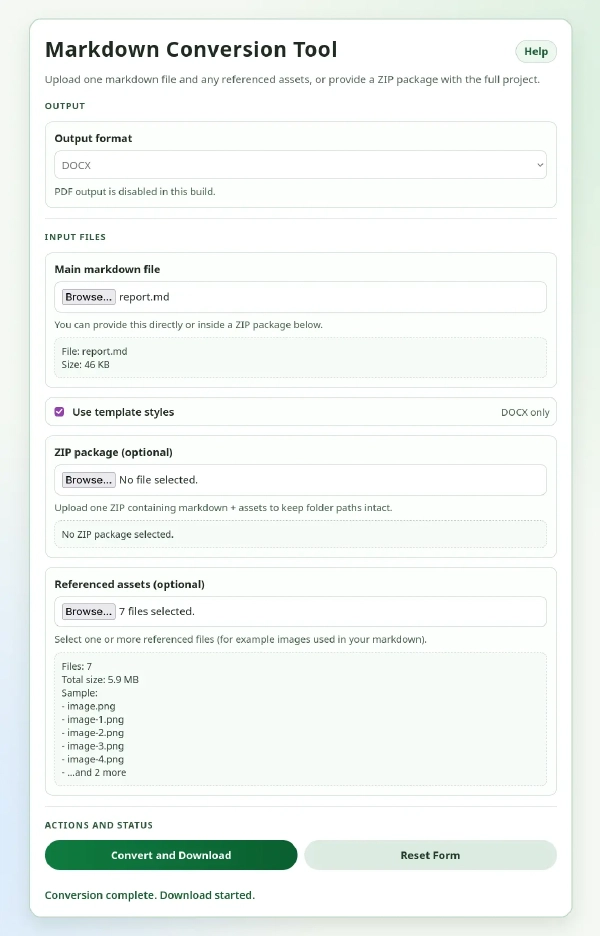
I’ve been using Markdown for a long time, mainly for technical notes and for drafting report content. While pandoc on the command line works well for converting such content to either DOCX or PDF, it needed other support scripts and programs to collate multiple Markdown files together. Plus, unless you spend a long time (or a lot of tokens) crafting a complex LaTeX script1, templating documents for PDF can be tricky. So a small web app that lets you drop the content in and generate a document is much easier to use, and could be locally hosted for anyone to use.
If you’re interested in running it or building on it, the README provides more detail on how it works and how to run it.
More interesting, to some, is that this was my first attempt at fully building a tool using an LLM.
Because it could be containerised and run locally, it did not need to be perfect or secure, so I decided to vibe-code it using my existing GitHub Copilot subscription.
I thought it might be useful to run locally on a server, so a web application seemed like a nice solution. After a brief description of what I wanted, it chose Python and FastAPI as a wrapper for pandoc doing the document conversion. It chose Jinja2 for building the web page, and put everything in a Docker container.
Now, I’ve done a lot of programming in my career, but it’s mostly been CLI and lower-level tools, and rarely anything web or Python related. So I’m not necessarily the best judge when it comes to lightweight Python web applications. All that aside, I think it did a decent first job. Sure, I had to prompt it a bit more to tidy the layout and add a help file, but it built a functional app pretty quickly.
Of course, as I am a security person, I did have the agents do a few passes to check for common security and architectural issues. Although it is only intended to run locally, any app that takes and parses lots of user data is going to have potential security issues. The first prompt to harden the app led to many changes, especially in the Docker file:
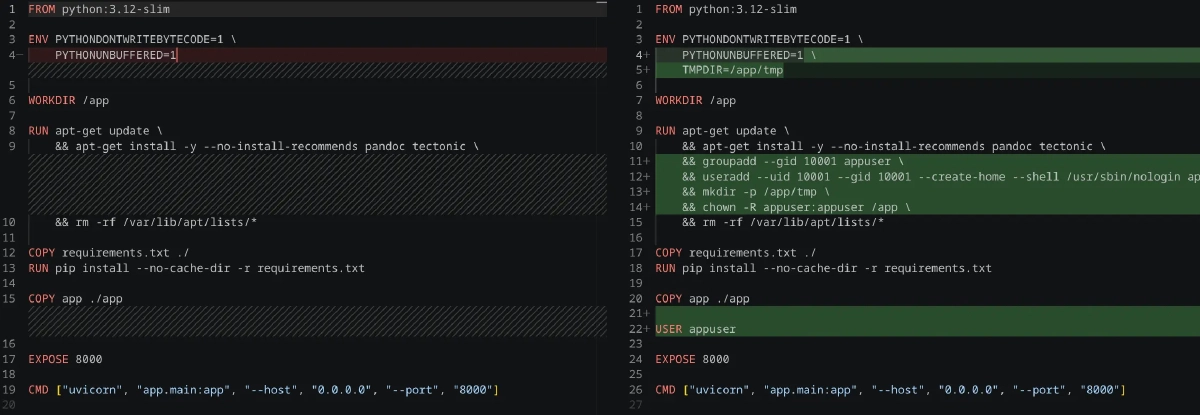
According to Copilot, this initial security pass (in this commit) did the following:
adds request rate limiting, request IDs, structured JSON logging, and a security middleware that sets strict headers such as X-Content-Type-Options, X-Frame-Options, Referrer-Policy, Permissions-Policy, Content-Security-Policy, and HSTS when HTTPS is in use. It also adds tighter ZIP validation to block symlinks, excessive path depth, overly large archives, suspicious compression ratios, and too many entries, while enforcing per-file and total upload limits before conversion. On the deployment side, the Dockerfile was hardened by creating a dedicated non-root user, setting a writable temp directory, and running the container without root privileges.
With the large caveat that I’ve never been a web security guy, that all sounds sensible to me.
The next set of my prompts separated the Python into multiple files, added logging, and made the Docker image easier to use.
A second security pass added even more hardening:
This commit is a security hardening pass for the Markdown conversion app, and the main theme is reducing abuse and information disclosure without changing the core document-conversion workflow. The key change is in request handling: it adds trusted-proxy controls for client IP resolution, so X-Forwarded-For values are only honoured from explicitly trusted sources, preventing spoofed headers from bypassing rate limits. It also bounds the in-memory rate-limit store with a maximum bucket count and pruning logic, which reduces memory growth under high IP churn. In addition, conversion failures are no longer returned with raw pandoc stderr output; instead, the app returns a generic message plus a request ID while logging detailed diagnostics server-side, which keeps backend internals out of user-facing responses.
The second major area is filesystem and output safety. The app now validates upload paths with a safe_join_under guard to ensure writes stay inside the temporary working directory, blocks path traversal and invalid filenames, sanitises download names to a strict safe character set, and prevents ZIP archive abuse by checking entry count, depth, symlink entries, and suspicious compression ratios.
The Docker and app config also add clearer security defaults, including trusted proxy environment variables, stricter headers, and a safer non-root runtime. Overall, this commit turns the app from a simple utility into a more defensive production service by closing attack paths around proxy spoofing, path traversal, archive bombs, and leaked internal error details.
Again, that all sounds like sensible stuff, and it didn’t affect the app’s functionality.
Overall, the initial build cost about $4 in tokens, albeit before GitHub’s summer pricing changes. It only took a couple of hours, or in less conventional units: roughly one disappointing football match2.
Adding PDF export may not have been the best choice. The Docker image for a full LaTeX environment for generating PDFs is more than 7 GB, compared with a few hundred megabytes for DOCX alone. For that reason, I separated the PDF functionality and made it optional. This means two Docker images: one for the core functionality that does not need to be rebuilt as often, and one for the app that sits on top of it. That means that if you do include the PDF functionality, you are not having to rebuild the entire LaTeX image every time. Or you can exclude the PDF option entirely from the Docker image build.
Ideally, we will add the ability to provide a LaTeX template to style a generated PDF, but that won’t be simple. And maybe unnecessary, as you can easily convert from docx to PDF.
When I get time it’s probably sensible to add fully-templated PDF generation, or take out the PDF functionality entirely as a plain PDF generated without a style template is pretty ugly. Or maybe we can have a built-in default template that at least produces an okay-looking PDF. That’s a decision for another time.
Topics

16 Sep 2026
Why products should never charge more for default security features

16 Aug 2026
A pragmatic list of cybersecurity advice for every home

15 Jul 2026
How to onboard users and managed devices without a single password

18 Jun 2026
We all need to channel our inner Johnny Rico and prepare for the next wave of bugs

13 May 2026
Restricting search engine and user access to a staging Hugo site with Cloudflare

06 May 2026
A custom Hugo sitemap that works with a Pages worker